How do you get a Google Knowledge Panel for your business?
Google generates Knowledge Panels automatically and says it doesn't create them on request. This explainer, built from Google's own help pages, shows which box your business can actually get: a Business Profile, a claimable panel, or neither yet.
On this page
You can’t request one. Google says Knowledge Panels are generated automatically and that its current policy is not to create or delete them manually. If your business serves customers at a location or within a service area, Google’s own help pages point you to a Google Business Profile instead, a box that looks similar to a Knowledge Panel and that you can add and manage yourself. If a Knowledge Panel already exists for your business, you may be able to claim it, but Google says not every panel is claimable yet.
This explainer is built from Google’s Knowledge Panel Help, Business Profile Help and Search Central pages as they read on November 27, 2026. It sorts out which box applies to your business, what claiming a panel does and doesn’t give you, and what website markup can realistically do.
Knowledge Panel vs Business Profile: two boxes that look alike
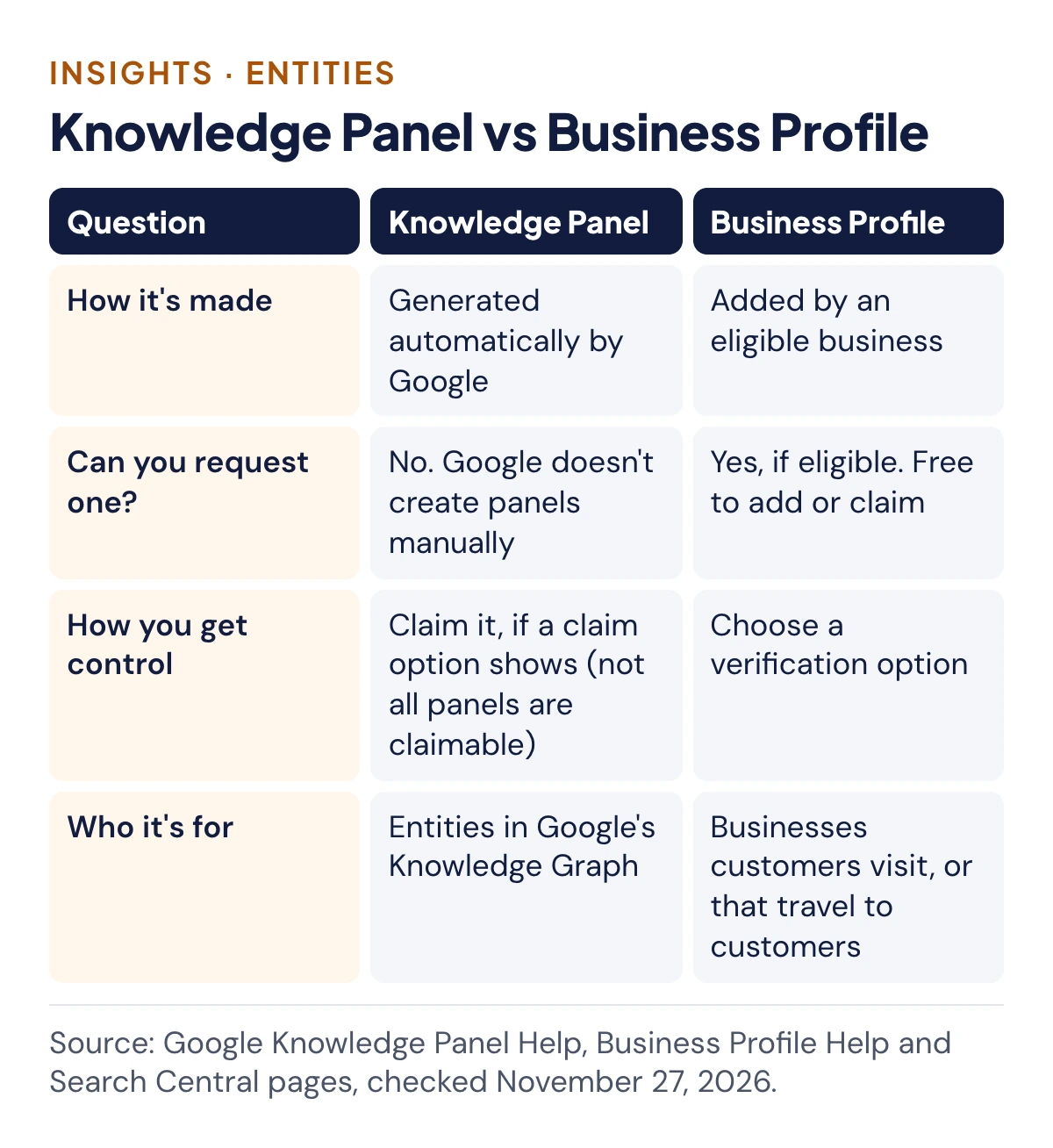
Most business owners who say “I want a Knowledge Panel” have seen one of two different things in Google’s results. They’re made differently and you control them differently.
A Knowledge Panel is generated by Google. In About knowledge panels, Google says panels are “automatically generated” for entities in its Knowledge Graph, using information from “various sources across the web,” and that they update automatically as information on the web changes. Google adds that in some cases it may work with data partners that provide authoritative data on specific topics, such as movies or music. For an organization’s panel, Google’s business details overview says its algorithms find details such as the site name, corporate contact information and social profiles, and that a verified official representative can override what Google finds.
A Business Profile is something you add. The same About page describes Business Profiles as looking “similar to knowledge panels,” but specific to businesses that serve customers at a location or within a service area. Google’s business details overview says that once you verify yourself as the owner, a Business Profile lets you edit details such as your address, contact information, business type and photos, and that this information can show in Google Maps and in the Google knowledge panel. In Add or claim your Business Profile, Google also says you can add or claim a Business Profile at no charge.
So when a local plumber or dental practice shows a box with its address, contact details and photos, that box is often fed by its Business Profile. That’s Sampark’s reading of Google’s description, not a rule Google states for every result.
One naming note: some of Google’s Knowledge Panel Help pages still use the old product name, Google My Business. They mean what Google now calls a Google Business Profile.
Which one your business can get
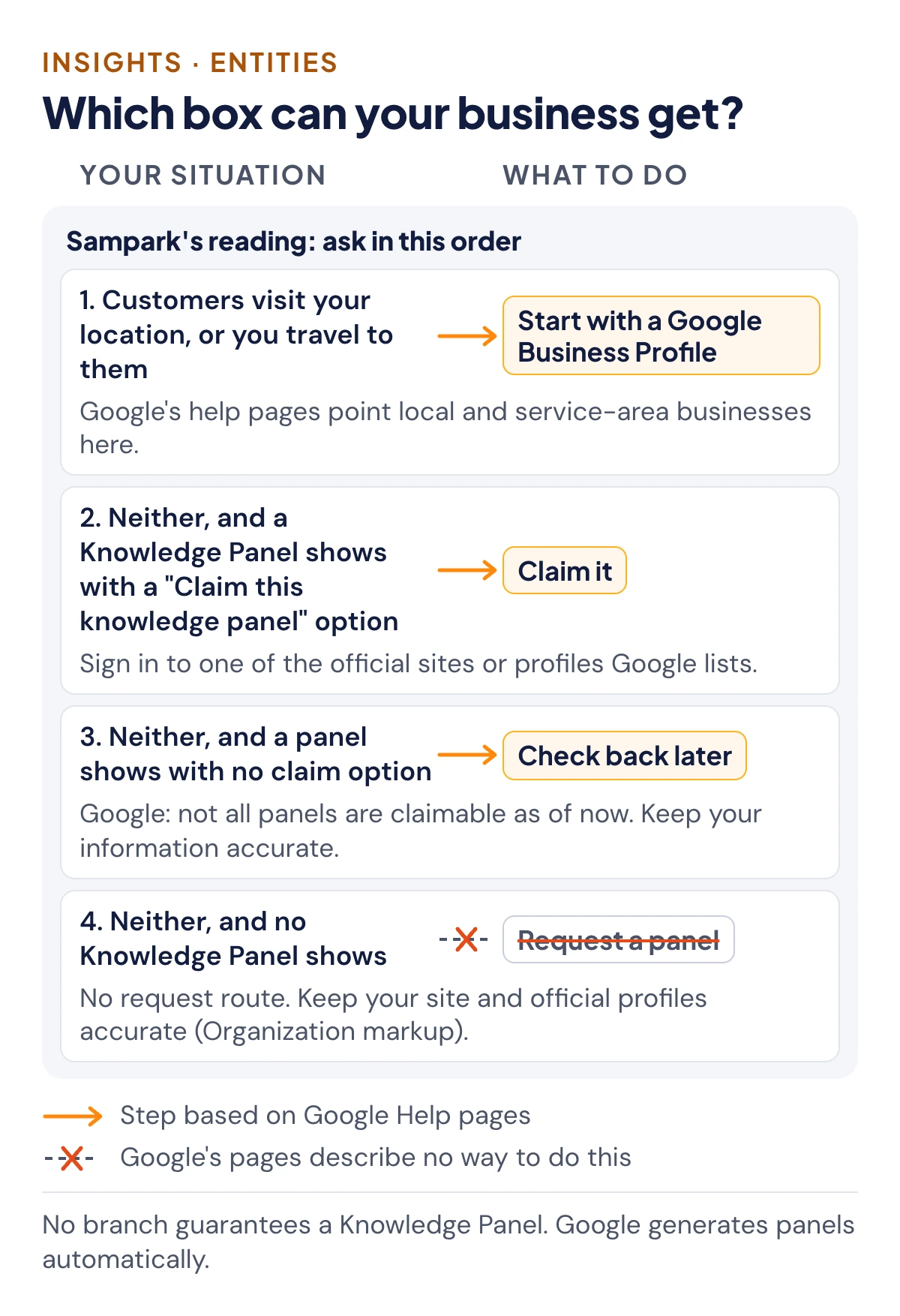
The routing below is Sampark’s reading of Google’s pages, not an official Google decision tree.
- You serve customers at a place, or you travel to them. Start with a Business Profile. Google’s Business Profile guidelines say a business is eligible if it “has a physical location that customers can visit, or travels to customers where they are.” Service-area businesses should have one profile. A mailing address you rent but don’t operate from isn’t eligible. And in Get verified on Google, Google tells local businesses that serve customers at a location or within a service area to create a Google Business Profile.
- You don’t fit that description, and a Knowledge Panel already shows for your business name. Check whether you can claim it (next section).
- You don’t fit that description, and no panel shows. There’s nothing to apply for (see Limits below). What you can control is the accuracy and consistency of your information on your own website and official profiles, including Organization markup.
Three hypothetical US businesses show how this plays out. They’re illustrative, not real companies or Sampark clients:
- A plumbing company serving a metro area travels to customers, so it fits Google’s service-area description. Its first step is one Business Profile for the business, not a Knowledge Panel claim.
- A single-location restaurant has a place customers visit. It starts with its Business Profile and can add LocalBusiness markup, using the most specific subtype that fits, to its website to describe its hours.
- An online-only software company has no storefront and doesn’t travel to customers. Google’s guidelines don’t describe it as eligible for a Business Profile as written, so it should check whether a panel already exists and is claimable, and put Organization markup on its home page.
If a Knowledge Panel already exists: how claiming works
Google says the subject of a Knowledge Panel, or an official representative, can claim it and suggest changes. The process in Get verified on Google, as of November 27, 2026:
- Sign in to a Google Account and search for your business.
- Find the panel and select Claim this knowledge panel. Google says the option may appear in the panel’s About section.
- Sign in to one of the official sites or profiles Google lists for the entity. The page names YouTube, Search Console, Twitter and Facebook as examples.
If Google can’t identify sites associated with your business, it asks you for more information to verify them.
Two caveats matter more than the steps. First, Google says “not all knowledge panels are claimable as of now” and suggests checking periodically for the claim button. A missing button isn’t something you can fix by filling in a form. Second, if someone else already verified the panel and you still can’t identify that person after checking with others in your organization, Google points you to its Account Recovery process. Google emails the current owners or managers of the account and says it waits 3 business days for them to respond; if they don’t, the panel becomes claimable again.
Once verified, a panel can have Owners, Managers and Contributors. All of them can suggest changes, and Owners and Managers can add or remove users.
What verification can’t change
Claiming a panel gives you a stronger voice, not an edit button. In Submit feedback on content about you, Google says anyone can send feedback, but it can prioritize verified feedback, which it says it reviews within a few days, adding that “this can sometimes take more time.” It checks requested changes against other public information on the web.
The same page lists things verification won’t get you:
- If your panel has no image, Google says it can’t add one at your request.
- Google doesn’t accept custom subtitles.
- The description can’t be edited.
Because Google checks changes against public information, our advice is to make sure the correct information is public and consistent first, on your site and official profiles, and then send feedback.
What Organization and LocalBusiness markup can and can’t do
Structured data is often sold as the way to “get” a panel. Google’s documentation describes something narrower.
Organization markup helps Google understand your organization’s administrative details and disambiguate it in search results, according to Google’s Organization structured data page. Some properties can influence visual elements, such as which logo appears in search results and in the knowledge panel. Google recommends putting it on your home page or a single page that describes the organization. It has no required properties, and the url property helps Google uniquely identify the organization.
LocalBusiness markup lets a business tell Google details such as business hours and departments, per Google’s LocalBusiness structured data page. LocalBusiness is a subtype of Organization, and for a local business such as a restaurant or physical store, Google recommends the most specific subtype that fits. Name and address are required. That page doesn’t mention Business Profiles, so don’t treat markup as a replacement for one.
Neither is documented to create a panel. Google’s general structured data guidelines say: “Using structured data enables a feature to be present, it does not guarantee that it will be present.” The Organization and LocalBusiness pages say Google doesn’t guarantee that features will show. If you’ve added markup and a Knowledge Panel still shows information you believe is incorrect, Google’s business details overview suggests waiting at least one week after the marked-up page was last crawled, then reporting it through the Feedback link at the bottom of the panel.
Limits and common misreadings
- “There’s a way to apply.” The Google pages reviewed for this guide describe no request form, timeline or criteria for getting a new Knowledge Panel. Anyone promising you one is promising something Google says it doesn’t do manually.
- “Every panel can be claimed.” Google says not all of them can, as of now.
- “A panel helps you show up in AI Overviews.” One vendor guide reviewed for this article says it’s likely that a panel could lead to more brand mentions in AI Overviews and AI Mode, and doesn’t cite Google documentation for it. None of the Google Knowledge Panel Help or Search Central pages linked in this guide say that having a panel affects visibility in AI Overviews or AI Mode. That doesn’t show it has no effect. Google just doesn’t document a link on these pages.
- “Create a Wikipedia or Wikidata page about your business.” The same vendor guide recommends getting a Wikipedia page where possible (while warning against writing your own) and creating a Wikidata entry, without citing Google documentation for either. Google’s About knowledge panels page doesn’t mention Wikipedia or Wikidata at all. We don’t recommend creating or editing encyclopedia entries about your own business to manufacture notability. It risks misrepresenting your business, and it’s the kind of fake-entity work Sampark doesn’t do.
- “You can pay for better placement.” For local results, Google says “there’s no way to request or pay for a better local ranking.” It describes local results as based mainly on relevance, distance and prominence.
This guide is also limited in what it can tell you. It’s based on Google’s documentation, not on a test Sampark ran, and Google’s claim flow, sign-in options and eligibility rules can change. Check the linked pages before you act.
What to do next
A short order of operations:
- Decide which description fits: a place customers visit, a business that travels to customers, or neither.
- If one of the first two fits, add or claim your Business Profile and complete verification.
- Search your business name. If a panel shows with a claim option, claim it. If it doesn’t, don’t chase one.
- Add accurate Organization markup to your home page (or LocalBusiness markup, using the most specific subtype, if you have a location), and keep your name and details consistent across your official profiles.
Consistent business details matter beyond Google’s results, too. Our guide to why ChatGPT doesn’t recommend your business covers that side.
If you’re not sure which box applies to your business, Sampark’s entity and Knowledge Panel team can review your Business Profile eligibility and your site’s Organization markup. No one can promise you a Knowledge Panel, so we won’t.