Why doesn’t ChatGPT recommend my business? A practical guide for US companies
There's no switch that makes ChatGPT recommend a business. This 12-point check shows what OpenAI actually documents, what you control, and how to test what ChatGPT says about you without fooling yourself.
On this page
When ChatGPT leaves your business out, there are four causes worth ruling out first. ChatGPT search can’t reach your website. The information about your business is thin or inconsistent. You tested a question your business isn’t an obvious answer to. Or you’re judging from one answer that would change on the next run.
You can’t buy a recommendation or switch one on. OpenAI says placement in ChatGPT search “is not guaranteed,” and that ads “do not influence ChatGPT’s answers.” You can, though, check and fix most of what’s in your control. The 12-point check below takes about 45 minutes the first time and costs nothing beyond a browser and a free ChatGPT account.
This guide is for US business owners and marketers, especially local and service businesses. It reflects OpenAI’s documentation as checked on November 26, 2026. Several features it covers are new or in beta and change often.
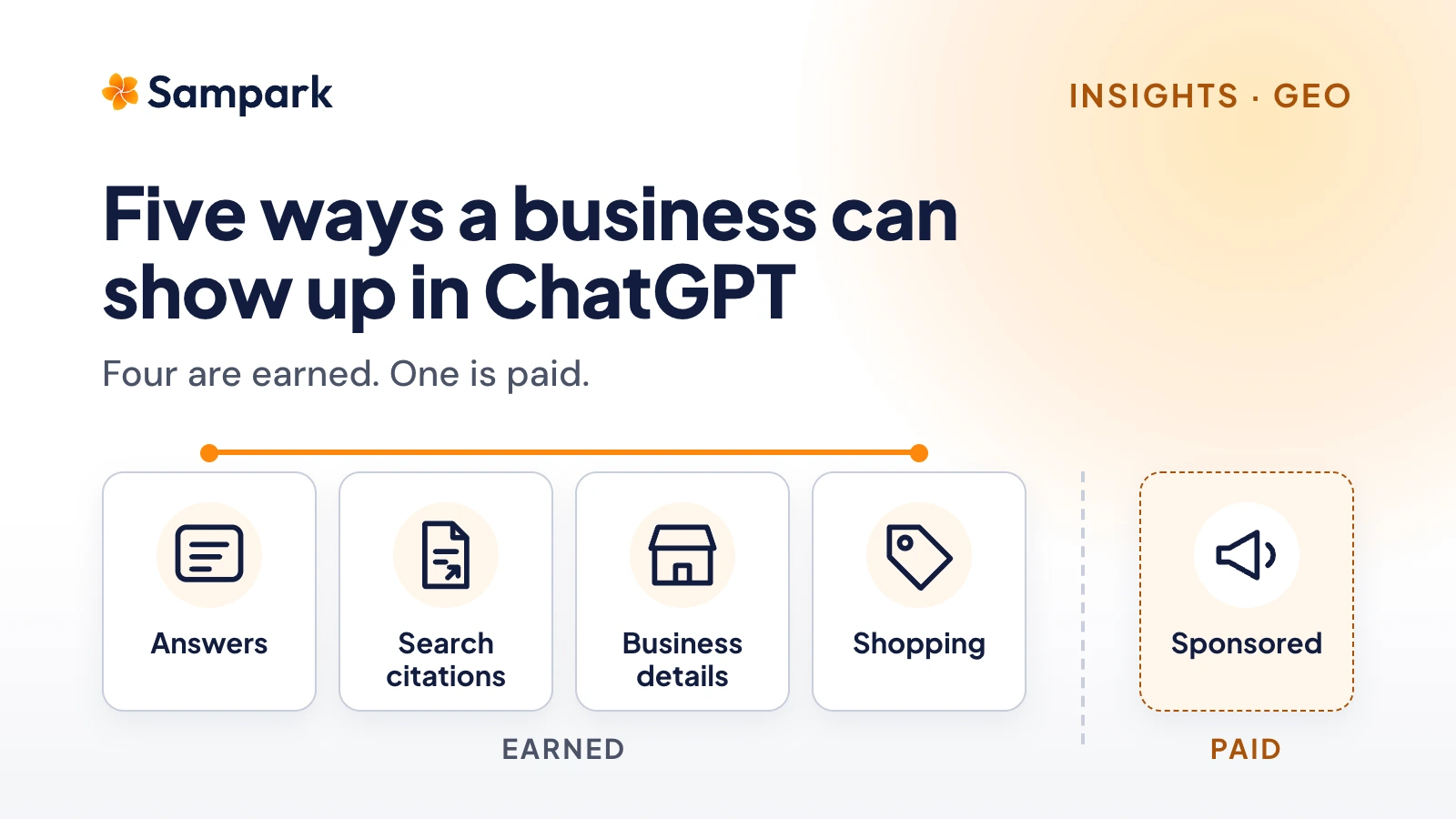
Five different ways a business can show up in ChatGPT
“ChatGPT recommended us” can mean very different things. Separating them tells you which fixes matter and keeps you from counting an ad as a recommendation.
| Where you might appear | What it is | Organic or paid | What OpenAI says |
|---|---|---|---|
| A written answer | ChatGPT names your business in its reply | Organic | Ads “do not influence ChatGPT’s answers” |
| A search citation | ChatGPT searches the web and links to your page as a source | Organic | Sites must allow OpenAI’s search crawler; “placement is not guaranteed” |
| Your business details | Information from a listing you claimed in Business Hub (beta since November 10, 2026) | Organic | Lets eligible businesses update key details; OpenAI doesn’t say it improves recommendations |
| Shopping results | Product cards when someone shops in ChatGPT | Organic | “Product results are not ads.” Merchants are ranked by factors like availability, price and quality |
| A sponsored placement | An ad, including a sponsored Business Agent | Paid | Ads are “always clearly labeled as sponsored and visually separated from the organic answer” |
The first four are earned, and the last one is bought. Buying the fifth doesn’t buy the first four.
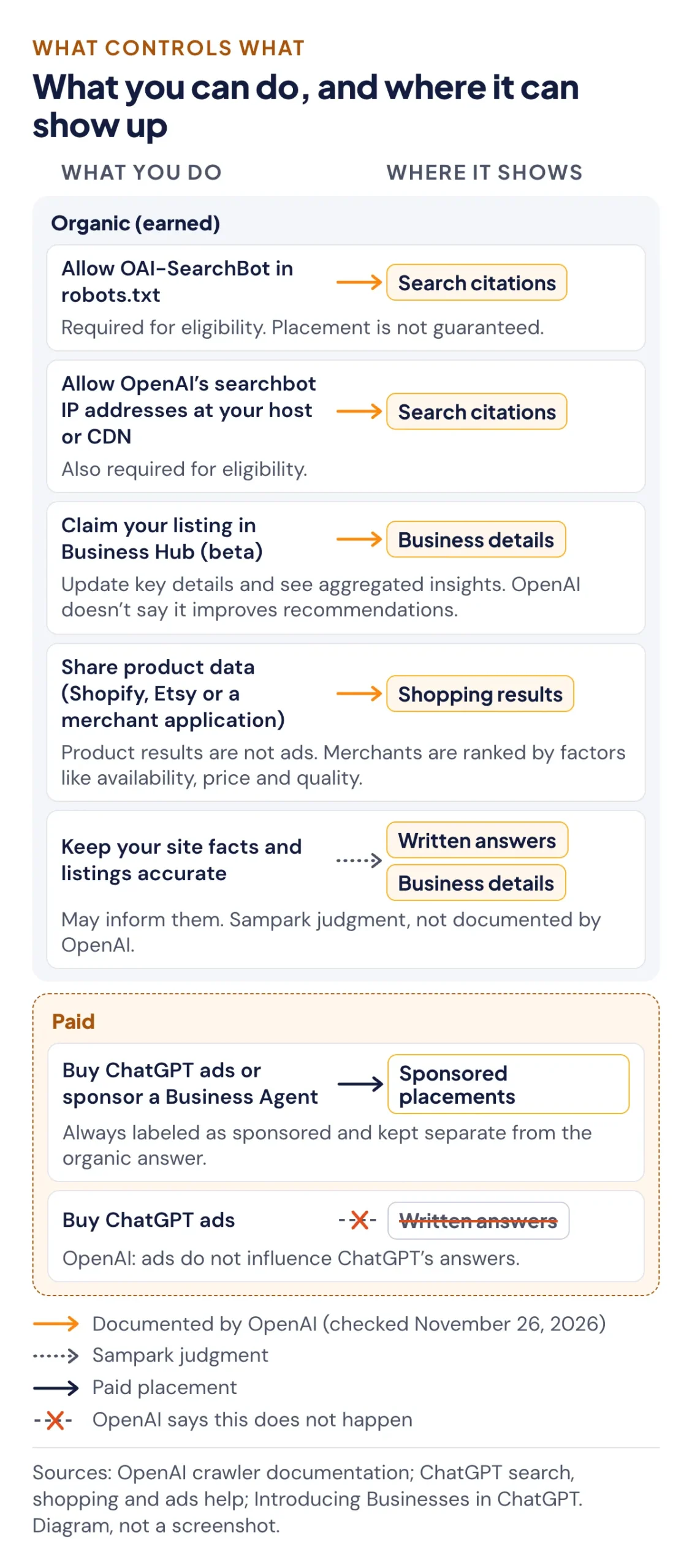
Why businesses go missing
The causes you can check fall into a short list. Each one maps to a check below.
- ChatGPT search can’t read your site. Your robots.txt blocks OpenAI’s search crawler, or a firewall or CDN blocks it before it reaches the page. The site might also be unfinished: a parked domain, a “coming soon” page or a development copy. (Checks 1–3)
- There isn’t enough clear information about you. Your services, service area and contact details live in images, PDFs or vague marketing copy rather than plain text. (Checks 4–5)
- Your information disagrees with itself. Your website, Google Business Profile, Bing Places and directories show different names, phone numbers or hours. (Check 6)
- You’re testing the wrong way. You asked once, from a personalized account, in a different city, using your own business name. One answer can’t tell you much. (Check 9)
- Someone is a stronger match. For some questions, other businesses are better documented, closer or more relevant. No checklist fixes that. Better services, clearer pages and a stronger reputation do, slowly. (Not checkable here.)
That last point is our judgment, not OpenAI policy. OpenAI doesn’t publish how ChatGPT chooses which businesses to mention or cite. The closest it comes is a short list of factors for ranking shopping merchants (Check 8).
How to use this checklist
Work through the checks in order. The early ones can stop ChatGPT search from showing you at all, so there’s little point testing answers until they pass.
- Mark each check ✅ pass, ⚠️ partly or ❌ fail.
- Priority 1 means fix first: it can keep you out of ChatGPT search entirely. Priority 2 affects whether ChatGPT describes you correctly. Priority 3 helps you measure and decide. These priorities are our editorial judgment, not scores from OpenAI.
- Keep a log. A spreadsheet with one row per test run is enough. The columns are at the end of Check 9.
- Repeat monthly, with the same questions, so changes reflect ChatGPT and your fixes rather than new wording.
Part A: Can ChatGPT search reach your website?
- Check 1. Your robots.txt allows OAI-SearchBot. Priority 1.
- How to check: open
https://yourdomain.com/robots.txtin a browser. Look for aUser-agent: OAI-SearchBotgroup and the generalUser-agent: *group. - Pass: nothing disallows OAI-SearchBot from the pages you want found. A blanket
User-agent: *followed byDisallow: /is a fail, because it blocks every crawler, including OpenAI’s. - Why it matters: according to OpenAI’s crawler documentation, sites that opt out of OAI-SearchBot won’t be shown in ChatGPT search answers, though they may still appear as navigational links. After you change robots.txt, allow about 24 hours for ChatGPT search to pick it up.
- Don’t mix it up with GPTBot. GPTBot is a separate crawler for model training. Blocking it doesn’t remove you from ChatGPT search, so you can decide about training and search separately. A third agent, ChatGPT-User, visits pages when a person asks ChatGPT to. OpenAI says robots.txt rules may not apply to it, and it doesn’t decide search eligibility.
- How to check: open
- Check 2. Your host, CDN or firewall isn’t blocking OpenAI. Priority 1.
- How to check: ask whoever runs your hosting, CDN or security plugin whether bot-blocking or “AI crawler” settings are on. Ask them to confirm that traffic from OpenAI’s published search-crawler IP addresses is allowed. OpenAI links the address list from its crawler documentation.
- Pass: your host or developer confirms it in writing.
- Why it matters: OpenAI’s ChatGPT search help article lists two conditions for eligibility: allowing OAI-SearchBot, and making sure your host or CDN allows traffic from OpenAI’s searchbot IP addresses. A perfect robots.txt doesn’t help if a firewall turns the crawler away first.
- Check 3. Your site is live and indexable. Priority 1.
- How to check: in a private browser window, open your homepage and two service pages. Then type a made-up address on your domain, such as
/this-page-does-not-exist/. - Pass: real pages load, and the made-up address shows a “not found” page rather than your homepage or a placeholder.
- Fail signs: a “parked domain” or “coming soon” page; every address showing the same page; or, if you can view the page source, a
noindextag or a canonical link pointing to a development address such aslocalhost. These are common after a site launch or migration. They also hurt you in ordinary search engine optimization, not only in ChatGPT.
- How to check: in a private browser window, open your homepage and two service pages. Then type a made-up address on your domain, such as
Part B: Will ChatGPT describe you correctly?
- Check 4. Your core facts are in plain text on your own site. Priority 2.
- How to check: on your homepage and contact page, confirm your business name, address or service area, phone number, hours and main services appear as text you can highlight and copy. They shouldn’t appear only in images, PDFs or embedded maps.
- Pass: you can copy each fact as text.
- Why it matters: a crawler can only use what it can read. This is our recommendation based on how crawlers work, not a ranking rule from OpenAI.
- Check 5. Each service page says what you do, where and for whom. Priority 2.
- How to check: read each main service page as a customer would. Does it say plainly what the service is, which areas you cover, who it’s for and roughly what happens next? Does it answer the two or three questions customers ask most?
- Pass: a stranger could answer “Does this company do X in Y?” from the page alone.
- Why it matters: clear, direct answers to real customer questions are the core of answer engine optimization (AEO). That’s our editorial view. OpenAI doesn’t document how ChatGPT weighs page content.
- Check 6. Your main listings agree with your site. Priority 2.
- How to check: compare your name, address, phone, hours and website address across your site, Google Business Profile, Bing Places and the one or two directories that matter in your industry.
- Pass: they match everywhere, with no old phone numbers, closed locations or former business names.
- Why it matters: ChatGPT search sometimes uses other search providers. OpenAI’s Enterprise and Edu documentation names Bing, and OpenAI says ChatGPT may share a user’s location with third-party providers to answer questions about nearby businesses. Apart from claiming a listing in Business Hub (Check 7), we found no OpenAI documentation on correcting a wrong business detail in ChatGPT’s answers, so fixing the sources it may draw on is the practical step. Consistent business information is also part of entity and Knowledge Panel work.
- Check 7. You’ve checked whether you can claim your business in ChatGPT. Priority 2. Re-check this before relying on it, because it changes often.
- What it is: OpenAI launched Businesses in ChatGPT in beta on November 10, 2026. Eligible businesses can claim a listing in Business Hub (
chatgpt.com/business-hub; you’ll be asked to sign in). After verification they can update key details, add product feeds and see aggregated insights, such as how often they’re mentioned, website clicks and common topics in conversations where your website is cited. OpenAI says insights appear only once they meet volume thresholds, and that businesses don’t see users’ conversations. - How to check: sign in to Business Hub and see whether your business can be claimed. Note what you’re asked for and whether any costs are shown.
- What it isn’t: OpenAI doesn’t say claiming your business improves recommendations, and its announcement doesn’t mention pricing. Treat it as a way to keep your details accurate and see some data, not as a ranking lever.
- What it is: OpenAI launched Businesses in ChatGPT in beta on November 10, 2026. Eligible businesses can claim a listing in Business Hub (
- Check 8. If you sell products online, they’re eligible for ChatGPT shopping. Priority 2 (ecommerce only; skip if you sell services). Re-check before relying on it.
- How to check: OpenAI says shopping is live for ChatGPT users in the US. If you sell through Shopify or Etsy, your catalog is already integrated. Other merchants can apply to share product data through OpenAI’s merchant page.
- Worth knowing: OpenAI says shopping product results are not ads, and that merchants are ranked by factors such as availability, price and quality.
- Check 9. You know what ChatGPT actually says about your type of business. Priority 2.
- How to check:
- Write five questions a real customer might ask without knowing your name. For example: “Who does same-day water heater replacement in Tulsa?” or “Best bookkeeping firm for restaurants in Austin.”
- In ChatGPT, open a new chat and select Temporary (or Temporary chat). Before your first message, choose Unpersonalized. In OpenAI’s Temporary chat documentation, unpersonalized temporary chats don’t use your memories or custom instructions, and temporary chats don’t create memories. This matters because OpenAI says saved memories can shape how ChatGPT rewrites a search. Labels can differ between the web and mobile apps, so if yours look different, check that help page. If you use a regular chat instead, the memory controls are under Settings → Personalization → Memory.
- Name the city in each question. ChatGPT may use your location for nearby-business questions, so testing “near me” from your office tells you about your office, not your customers.
- Run each question three times, each in a new temporary chat. Record every run.
- Pass: you appear in at least some runs, and every detail ChatGPT gives about you is correct.
- Expect variation: in a study of 80 queries run 20 times each (collected March 29 to July 29, 2026), 40.8% and 44.5% of the distinct web pages ChatGPT retrieved as possible sources, depending on the model, turned up in only one of the 20 runs. When the researchers compared pairs of runs, the overlap in those retrieved pages was about 0.30 on a scale where 1 means identical. The study measured the pages ChatGPT pulled in, not only the ones it cited, and its queries came from a public research dataset, half in English and half in Chinese, rather than from US local-business searches. Another study, of ChatGPT and Gemini, found recommended products “often change across repeated requests.” Consistency isn’t the same for every question, though. A vendor test by Conductor, using 14,000 API calls with standardized prompts across four AI assistants including ChatGPT, found the same brand led comparison-style prompts 91% of the time, while purchase-style prompts were the least consistent. That figure covers all four assistants together, not ChatGPT alone. These studies used different methods, and some tested the API rather than the ChatGPT app you use. Judge your results across all runs, not from a single answer.
- Log columns: run date (UTC), exact question, city named, where you ran it from, temporary chat (yes/no), sponsored result seen (yes/no), your business mentioned (yes/no), position if listed, details correct (yes/no), wrong details, URLs cited.
- How to check:
Hypothetical example, not a real business or Sampark client: a two-location plumbing company in Tulsa runs its five questions three times each, for 15 runs. It appears in four, always for water heaters and never for drain cleaning. In two of those four, ChatGPT gives an old phone number. The useful findings are the old number (Check 6) and the gap in drain-cleaning coverage (Check 5). Four appearances out of 15 is not a score or a ranking, and next month’s 15 runs could look different.
Part C: Keep paid and organic separate
- Check 10. You’re not counting ads as visibility. Priority 3. Re-check before relying on it, because ad features change often.
- The rule: OpenAI’s ads help article says ads “do not influence ChatGPT’s answers.” OpenAI also says ads are “always clearly labeled as sponsored and visually separated from the organic answer.”
- In your log: if a result is labeled Sponsored, record it as an ad, not as a mention.
- If you’re considering ads: ChatGPT ads are still a test, which began in the US on February 9, 2026, for logged-in adult users on the Free and Go plans. Businesses can also sponsor a Business Agent as an ad destination, and that appears as a labeled placement. Ads can put you in front of people. They don’t make ChatGPT recommend you in its answers.
Part D: Measure, then repeat
- Check 11. You know whether ChatGPT sends you visitors. Priority 3.
- How to check: in Google Analytics 4, go to Reports → Acquisition → Traffic acquisition and change the table’s dimension to Session source. Look for any source containing “chatgpt” and compare month to month. If you claimed your business (Check 7), look at the insights in Business Hub too.
- Caveat: analytics can only count visits it can attribute, and a mention without a click never reaches your site at all. Seeing no
chatgpt.comvisits doesn’t prove ChatGPT never mentions you.
- Check 12. You’ve scheduled a monthly re-run. Priority 3.
- How to check: put a monthly reminder in your calendar. Re-run Check 9 with the same five questions and the same settings, and re-check Checks 1–3 after any website change, redesign or hosting move.
- Pass: you have at least two months of logged runs before you draw conclusions.
Reading your results
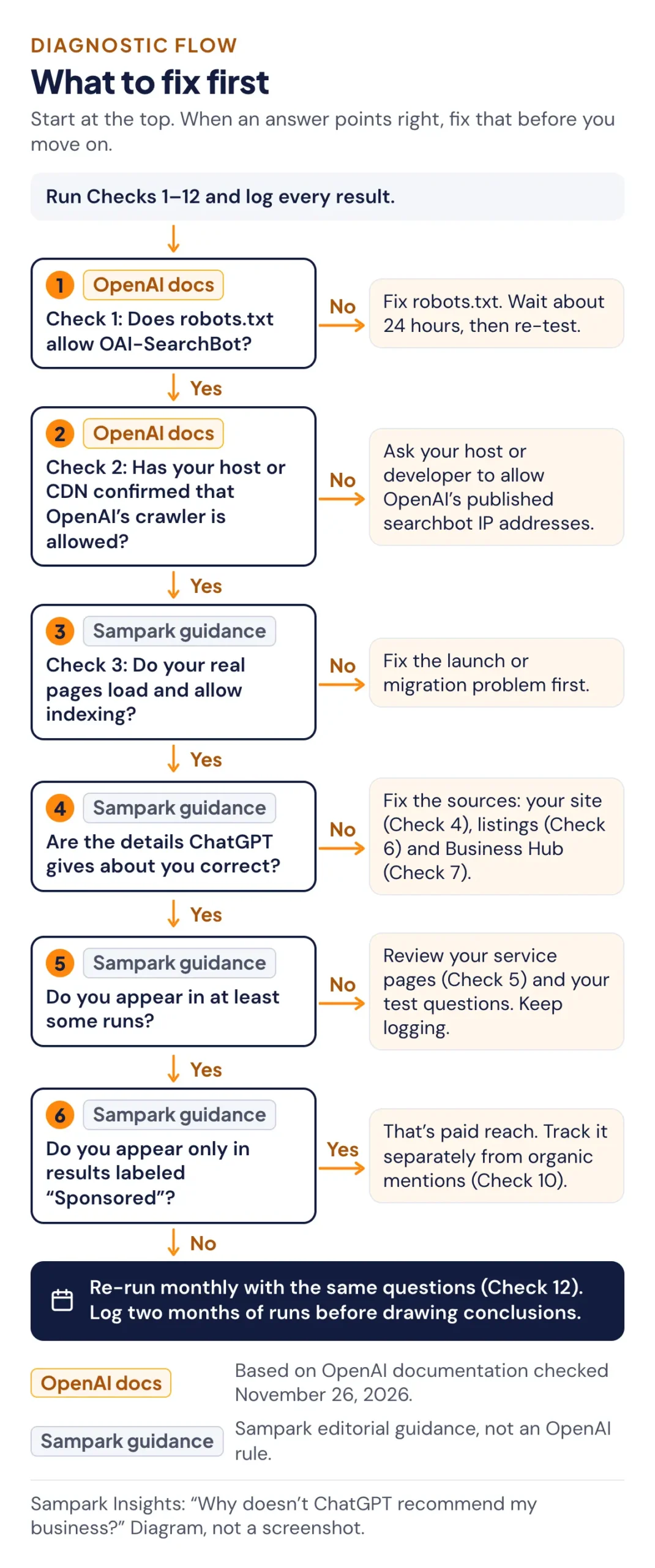
- Any Priority 1 check fails: fix it first. Until ChatGPT search can reach your pages, nothing else on this list can do its job. After a robots.txt change, wait at least a day before re-testing.
- Part A passes, but ChatGPT gets your details wrong: focus on Checks 4, 6 and 7. In our judgment, wrong details may mean other sources disagree with your site.
- Part A passes, details are right, but you rarely appear: look at Check 5 and at the questions themselves. Are you testing services you’re actually known for, in places you actually serve? Then keep logging. A few months of runs tell you more than one afternoon.
- You appear only in labeled ads: that’s paid reach, not organic visibility. Track it separately.
What this checklist won’t catch
- Why ChatGPT chose one business over another. OpenAI doesn’t publish how it ranks citations or businesses, beyond broad factors for shopping merchants. One academic study found that Google Search results and the pages OpenAI’s API retrieved, combined, recovered only about a quarter (26% to 28%, depending on the model) of the URLs ChatGPT cited. That suggests a strong Google ranking doesn’t map neatly onto ChatGPT. In a small two-city, one-day field test, 31.0% of 58 local businesses ChatGPT recommended were in Google’s local top three; the author notes the highest overlap possible in that test was 62.1%. The same test found 98.3% of them were real businesses serving the area.
- What other people see. Location, memory, account type and the question’s wording all change results. Your log reflects your settings on your test dates.
- Whether a single fix caused a change. Treat month-to-month differences as signals, not proof.
- Problems outside your website. Thin reviews, a weak local reputation or a service area that doesn’t match the question won’t show up as a failed check, but they can still matter.
If your Part A checks pass, your details are accurate everywhere, and you still never appear after several months of logged runs, a deeper audit of your content, entity information and competitors is worth doing.
Common questions
Can I pay to be recommended by ChatGPT?
No. You can buy ads, which OpenAI says are labeled as sponsored and kept separate from answers, and you can sponsor a Business Agent. But OpenAI says ads don’t influence ChatGPT’s answers. Be wary of anyone who claims they can buy you a place in ChatGPT’s answers.
Does ChatGPT use my Google rankings?
OpenAI doesn’t say so. It says ChatGPT search sometimes uses other search providers, and its Enterprise and Edu documentation names Bing. Independent studies so far suggest ChatGPT’s sources overlap only partly with Google’s results. Solid traditional SEO still helps people find you in search engines, so it’s worth keeping, but it isn’t a direct line into ChatGPT.
Do I need an llms.txt file or special schema markup?
OpenAI’s published guidance on ChatGPT search doesn’t list llms.txt, schema or structured data as requirements, as of November 26, 2026. Google says there are no special files or schema required to appear in its AI Overviews or AI Mode. Accurate structured data can still help other systems understand your business. Just don’t treat it as an AI switch.
ChatGPT has my phone number wrong. How do I fix it?
Apart from Business Hub, we found no OpenAI documentation on correcting an individual business detail in ChatGPT’s answers. Fix it at the source: your website (Check 4), your main listings (Check 6) and, if you’re eligible, your Business Hub listing (Check 7). Then re-test over the following weeks.
How long does a fix take to show up?
OpenAI says robots.txt changes take about 24 hours to affect ChatGPT search. For everything else, such as new page content or corrected listings, OpenAI publishes no timeline, and we won’t invent one. Keep running your monthly checks.
What to do next
Start with Part A today, since it’s the only part that can lock you out completely. Then work through Part B over the next week and set up your log for Check 9.
If you’d rather have it done for you, Sampark’s generative engine optimization (GEO) team can run this audit. GEO is the work of improving how AI assistants find and describe your business. We’ll show you what we found and what we think is worth fixing first. We can’t promise you a mention in ChatGPT, and no one honestly can.
Sources
All checked November 24–26, 2026. OpenAI features in beta or testing can change without notice.
- OpenAI, Overview of OpenAI crawlers
- OpenAI Help Center, Searching the web with ChatGPT and ChatGPT search for Enterprise and Edu
- OpenAI, Introducing Businesses in ChatGPT (November 10, 2026; updated November 19, 2026)
- OpenAI Help Center, Shopping with ChatGPT search and OpenAI, merchant page
- OpenAI Help Center, Ads in ChatGPT, and OpenAI, Testing ads in ChatGPT
- OpenAI Help Center, Temporary chat in ChatGPT and Memory in ChatGPT
- Google Search Central, AI features and your website
- Google Analytics Help, Traffic acquisition report
- Understanding ChatGPT Citations (arXiv preprint, October 2026)
- Auditing AI-Generated Product Recommendations (arXiv preprint, September 2026)
- Conductor, AI recommendation consistency analysis (vendor study, updated October 7, 2026)
- Ryan Doser, Does ChatGPT recommend local businesses? (independent field test, October 2026)