Should your small Google Ads account turn on AI Max for Search?
AI Max for Search is a setting layer inside Google Ads Search campaigns, not a new campaign type. It's on by default for new Search campaigns, and Google announced it would start migrating some older campaigns in September 2026. This guide turns Google's own Help pages into a readiness check a small advertiser can run before keeping it on, testing it or waiting.
On this page
AI Max for Search isn’t a new campaign type. Google describes it as an optimization layer inside an existing Search campaign, and turning it on switches on three features by default: search term matching, text customization and Final URL expansion. Keep it on, or turn it on, if your campaign uses conversion-based Smart Bidding, isn’t limited by budget, and sends traffic to a website whose pages and wording you’re comfortable letting Google pick from and quote. If you’re unsure, run Google’s built-in AI Max experiment on one campaign first. Wait, and fix the basics, if you bid with Manual CPC on thin conversion data, your budget runs out every day, or your ad wording is legally constrained.
There’s a twist for many small accounts: you may not be choosing at all. Google says new Search campaigns have AI Max turned on by default, and Google announced that from September 1, 2026, it would automatically upgrade campaigns that used campaign-level broad match or automatically created assets. So the more useful question is often “is my account ready for what AI Max already does, and which parts should stay on?”
Everything below comes from Google’s own Help pages and announcements, read on November 28, 2026. Sampark hasn’t run its own AI Max test, so where we give a view rather than Google’s, we say so.
What AI Max for Search changes in a campaign
In Google’s words, AI Max is “an optimization layer within existing Search campaigns,” and “not a new campaign type” (Set up AI Max; How AI Max works). When it’s on, three features change how your ads match and what they say:
- Search term matching (set at the ad group level) lets your ads match searches beyond your keyword list.
- Text customization (campaign level) writes extra headlines and descriptions using the search and your landing page. Google says it “was formerly known as automatically created assets” (About text customization).
- Final URL expansion (campaign level) can send a click to a different page on your site from the one in your ad. Google says it “will only send traffic to URLs that are query relevant and themed to your ad group” (About Final URL expansion).
The settings depend on each other. Final URL expansion requires text customization, so turning text customization off also turns Final URL expansion off. URL exclusions need both on. That chain matters when you decide which parts to keep.
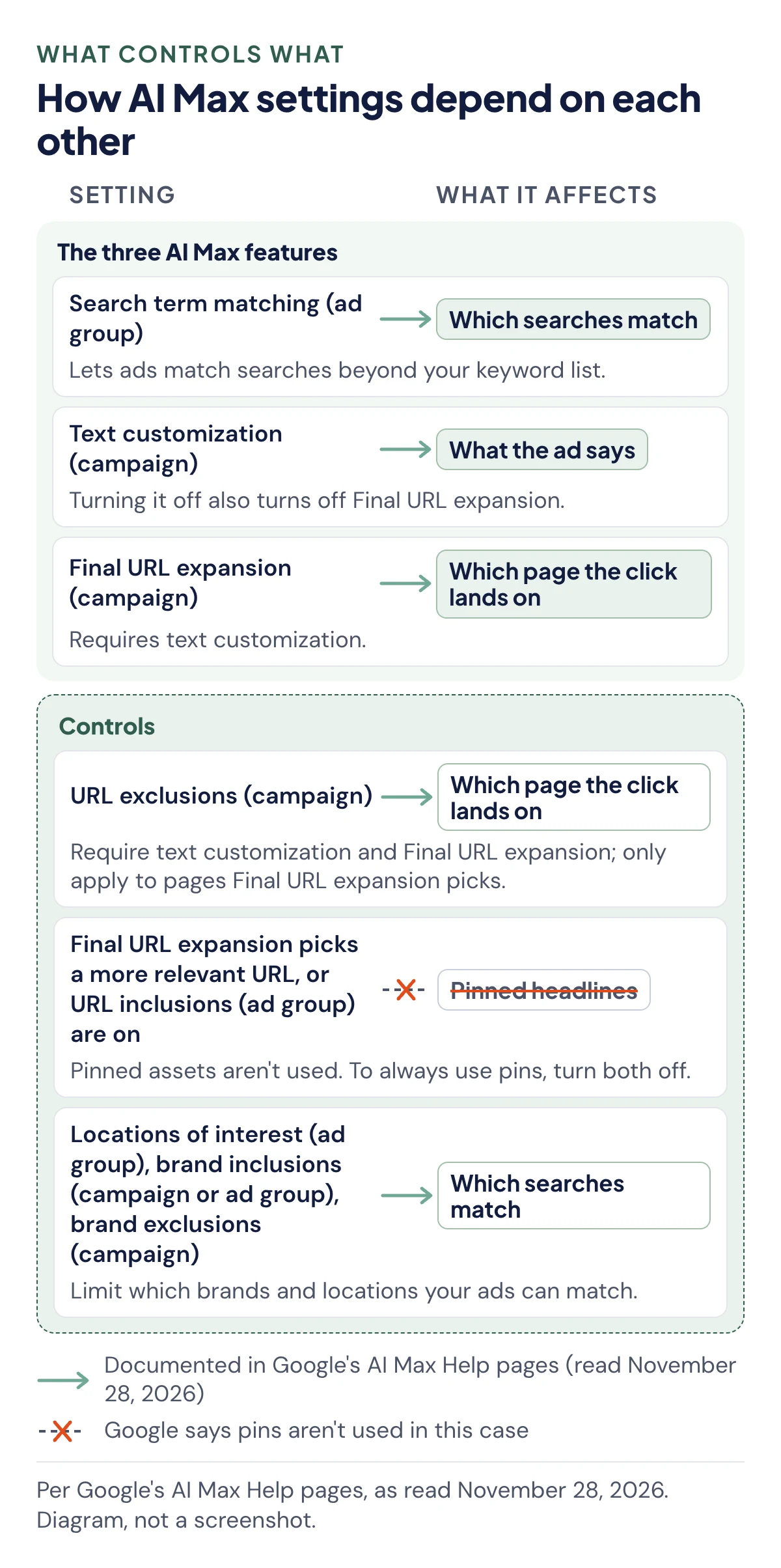
AI Max also comes with controls: locations of interest (ad group), brand inclusions (campaign or ad group), brand exclusions (campaign), URL inclusions (ad group) and URL exclusions (campaign) (How AI Max works).
Is AI Max already on in your account?
Check before you decide, because three routes can turn it on without a deliberate choice:
- New Search campaigns. Google says “New Search campaigns have the AI Max feature turned on by default” (Set up AI Max).
- The September 2026 migration. Google announced that on September 1, 2026, it would begin upgrading campaigns that used campaign-level broad match or automatically created assets, in place, rolling out through September. Under that plan, campaigns using campaign-level broad match get search term matching on, with text customization and Final URL expansion off, and campaigns using automatically created assets get search term matching and text customization on, with Final URL expansion off. None of the pages we read confirms how the rollout went (Google Ads Developer Blog, August 12, 2026; Google, updated June 11, 2026).
- Dynamic Search Ads, from February 2027. Google postponed the automatic upgrade of DSA campaigns from September 2026 to February 2027 (Google Ads Developer Blog, June 11, 2026). Google’s August post says in-account banners from September 2026 would encourage a voluntary one-click upgrade: select “Upgrade Your Dynamic Search Ads (DSAs) to AI Max” under Campaign Settings, in the Dynamic Search Ads setting (Google Ads Developer Blog, August 12, 2026). The two posts disagree on the details. The June post says the ability to create DSAs is removed in January 2027 and that remaining DSAs move to “Performance Max or AI-powered Search campaigns.” The August post lists the permanent removal of new DSA ad group creation under its February 2027 heading and says unmigrated DSA campaigns “will automatically upgrade to standard Search ad groups with AI Max enabled.” If you run DSAs, re-check Google’s current pages before you plan around either date.
Public sources can’t tell you whether your own campaigns were migrated. Open each Search campaign’s settings and look at the AI Max section, and at the text customization and Final URL expansion settings, to see what’s actually on.
Availability, eligibility and cost
AI Max works inside Google Ads Search campaigns. As of November 28, 2026, the Google Help pages we checked don’t list country limits for AI Max, don’t set a minimum number of conversions, and don’t describe a separate charge for it. We couldn’t confirm pricing either way from first-party pages, so treat cost as “not stated” rather than “free.”
Two eligibility details are less clear than they look:
- Language. Google’s text customization page says text customization “supports all languages in Google Ads” (About text customization). The text customization FAQ adds a narrower rule for one part of it: “Advertisers with English assets are eligible for Google customized text assets generated using generative AI” (Text customization FAQ). So the English-only line covers the generative AI text assets, not text customization as a whole, and the FAQ doesn’t say whether assets in other languages can get them. For US advertisers writing in English, both pages agree. For other languages, check the current pages.
- Bidding. Google says “Features like search term matching, final URL expansion, and text customization require conversion-based Smart Bidding strategies in order to function effectively” (Set up AI Max). Note the wording: “to function effectively.” None of the pages we read says Manual CPC blocks AI Max.
A readiness check in seven questions
Answer each one for the campaign you’re thinking about, not the whole account. A “no” doesn’t mean never. It tells you what to fix or test first.
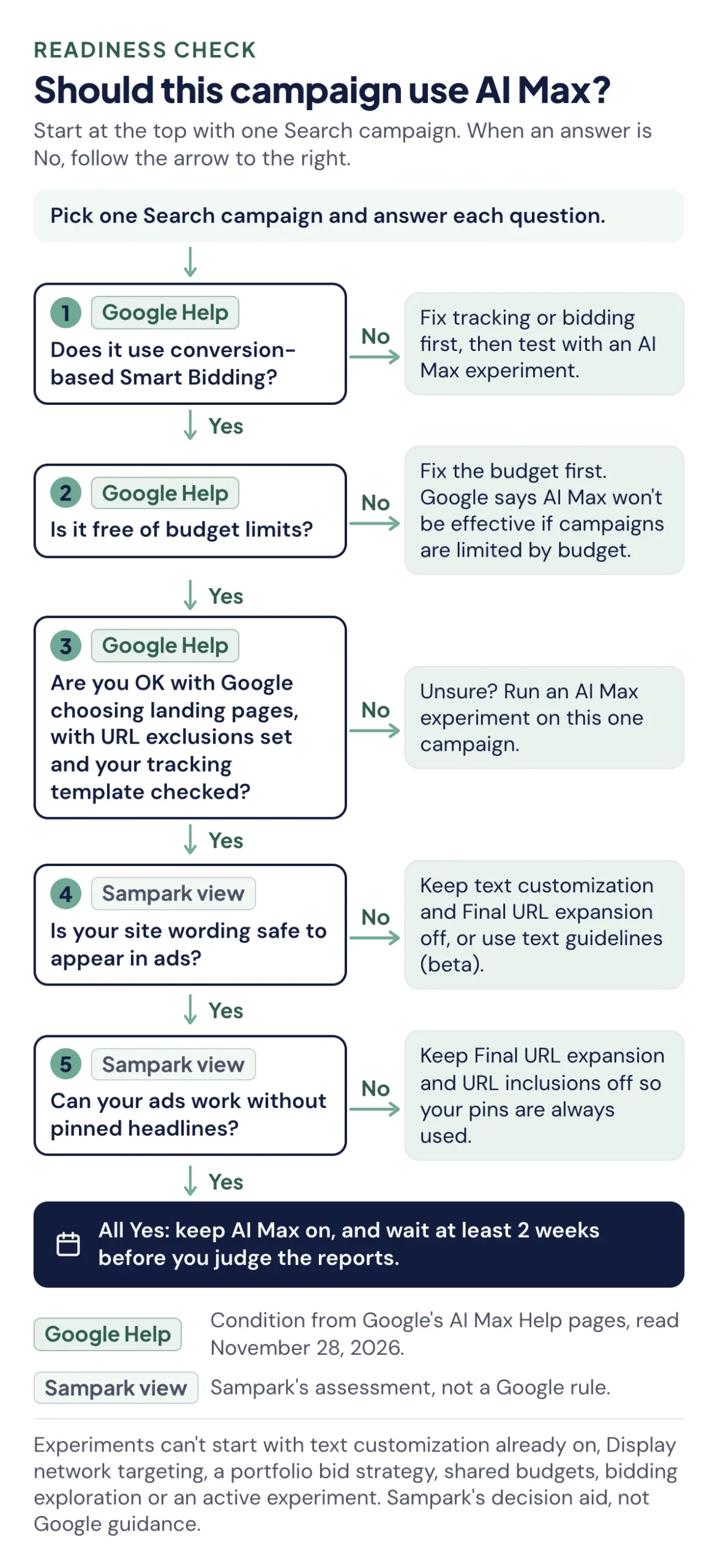
1. Does the campaign use conversion-based Smart Bidding?
That’s the condition in Google’s note above. If you’re on Manual CPC because you want control over which searches you pay for, Google says you don’t need to “switch from Smart Bidding to Manual CPC to control individual queries, pages, or assets,” and that you can use negatives and the AI Max controls instead (How AI Max works).
Our view: conversion-based Smart Bidding bids toward the conversions you track. If your conversion tracking is missing, double-counts or records low-value actions, fix that before anything else. We won’t give you a conversion-count threshold, because Google doesn’t publish one for AI Max and we haven’t tested one.
2. Is the campaign limited by budget?
Google is blunt: “AI Max won’t be effective if campaigns are limited by budget” (How AI Max works). If the campaign already spends its daily budget early, broader matching has no room to work. Either raise the budget for that campaign, narrow it, or wait.
3. Would you be comfortable with Google choosing any relevant page on your site?
Final URL expansion picks landing pages for you. Before you leave it on, look for pages you’d never want as an ad destination: old promotions, careers pages, thin location pages or blog posts that don’t convert. URL exclusions handle these, but Google says “URL exclusions only apply to landing pages automatically selected by Final URL expansion” (About Final URL expansion). Your own static final URLs and manual sitelinks keep serving until you change them.
Also check your tracking template. Google warns that dynamic URLs in tracking parameters “can sometimes lead to broken expanded landing pages with a 404 error” (How AI Max works).
4. Is every claim on your website safe to appear in an ad?
Text customization writes ad text from your landing pages, so your site copy becomes ad copy. Google tells advertisers to “Ensure your website content is accurate, not misleading, and not in violation of Google Ads policies or applicable laws,” and to monitor ad content in the asset details report (About text customization). Google also says customized assets serve only when predicted to perform better than yours, are reviewed and refreshed “at least every 48 hours,” and don’t count toward your 15 headlines and four descriptions.
Illustrative example (hypothetical, not a Sampark client): a dental practice in Ohio still has a 2025 “free whitening with every exam” page live on its site. If Final URL expansion sends a click to that page, or text customization draws on it, the expired offer could end up in ad text, unless the practice removes the page, excludes the URL or restricts the wording. Businesses in regulated fields, such as law firms or lenders, have a further question to settle before any site wording reaches an ad. Their own professional rules and their counsel decide whether that wording is allowed in advertising, not Google’s system.
If wording matters, Google offers text guidelines, which it calls “an experimental beta.” They require text customization on and allow up to 25 term exclusions and 40 messaging restrictions per campaign. Term exclusions can’t block prices; for that, Google points to the restriction “Don’t generate assets with prices.” Existing Google-written assets that don’t follow your guidelines “will stop serving and be marked as removed” (Text guidelines beta). Google doesn’t describe text guidelines as a compliance guarantee.
Our view: if your ad wording is legally constrained, review the asset report before and after turning AI Max on. Consider text guidelines, or turning text customization off. Remember that turning it off also turns off Final URL expansion. This isn’t legal advice.
5. Can your ads work without pinned headlines?
Answer “no” if a pinned headline or description has to show every time, because pins aren’t always respected. With Final URL expansion on, Google says pinned responsive search ad assets “aren’t used if a more relevant URL is chosen.” With URL inclusions on, pinned assets aren’t used. To always use your pins, turn off Final URL expansion and URL inclusions (Set up AI Max; About Final URL expansion). If a pinned disclaimer or license number must appear in every ad, that’s a reason to keep those two settings off.
6. Have you set brand and location controls?
If you don’t want to match competitor brand searches, or you only serve some areas, set brand exclusions and locations of interest before you widen matching. Both are in the controls list above.
7. Can you run an experiment on this campaign?
Google’s AI Max experiment splits traffic and budget inside one campaign. The control has AI Max off and the trial has it on, with all three features on by default. An experiment can’t start if the campaign already has text customization (formerly automatically created assets) on, targets the Display network, uses a portfolio bid strategy, uses a shared budget, uses bidding exploration, or already has an active experiment. If you don’t apply the result, the campaign reverts to its earlier AI Max settings (About AI Max experiments). In August 2026 Google also announced that AI Max experiments can run with brand or location controls on (Google, August 20, 2026).
Turn on, test first or wait: making the decision
Use your answers like this. This is Sampark’s assessment, built from the Google conditions above.
| Your situation | Our suggestion |
|---|---|
| Questions 1 to 5 are all “yes” | Turn it on, or keep it on, and read the reports after two weeks. |
| Mostly “yes,” but you’re unsure about landing pages, wording or results | Run an AI Max experiment on one campaign (question 7). |
| Manual CPC with unreliable conversion tracking, or limited by budget | Fix tracking, bidding or budget first, then test. |
| Legally constrained wording or must-show pinned text | Keep text customization and Final URL expansion off, or use text guidelines and review assets closely. |
| Campaign was migrated and you didn’t choose it | Run the seven questions on it now, and change the settings that fail. |
Google states no minimum duration, traffic level or significance threshold for AI Max experiments. Google does recommend waiting at least two weeks after enabling AI Max before making changes (About reporting in AI Max). Our view: don’t judge an experiment before that two-week mark. Low-volume campaigns will need longer before the difference means much.
How to measure results in the AI Max reports
Google’s reporting page names several places to look (About reporting in AI Max):
- Search terms report. AI Max traffic shows “AI Max” in the Match type column. Filtering on that match type “may show lower numbers,” because the filter leaves out “Other search terms.”
- Search terms and ad combinations. Google lists this view, formerly “Search terms and landing pages from AI Max,” with the search terms report. In the search terms report, you can check a search term or landing page and add it as a negative keyword or a negative URL.
- Keywords report. Look for two summary rows: “Total: AI Max expanded matches” and “Total: AI Max landing page matches.”
- Asset reports. Text written by text customization shows “Google AI” as the source. You can’t remove these in bulk in the Google Ads web interface; Google points to Google Ads Editor or the API.
- Landing pages report. This covers your own URLs and the ones Final URL expansion chose.
Check these against your own conversion data, not just clicks. If the expanded matches bring calls or leads you can’t serve, that’s a negative keyword or URL exclusion to add, whatever the conversion count says.
What Google’s 14% figure does and doesn’t tell you
Google says advertisers using AI Max “will typically see 14% more conversions or conversion value at a similar CPA/ROAS,” citing “Google internal data, 2025; for non-Retail advertisers” (About AI Max; Google, May 6, 2025). For campaigns with more than 70% of conversions or conversion value from exact and phrase match keywords, Google reports a typical uplift of 27%. In 2026, Google reported an average of 7% more conversions or conversion value at a similar CPA/ROAS with the full feature suite, compared with search term matching alone (Google, updated June 11, 2026).
These are Google’s own figures, with no published method or sample. They measure conversions or conversion value, not conversion rate. And none of the Google pages we read describes them as small-business results. At least one small-business guide repeats the figure as “up to a 14% increase in conversion rates” for small businesses, which isn’t what Google’s pages say. Treat the numbers as what Google observed on average across non-Retail advertisers, not as what your campaign will do.
Limits of this guide and what’s still unknown
- It’s dated. AI Max changes fast. Every platform detail here was read on November 28, 2026, and Google’s Help pages carry no updated dates. Two of them still describe the September 2026 migration in the future tense.
- Google’s pages conflict on when DSA creation ends and what DSAs become. They also leave open whether Google’s generative AI text assets are available to advertisers whose assets aren’t in English.
- No Sampark test data. We haven’t run AI Max in an account, so we can’t tell you what results to expect, and there are no screenshots here. The graphics are diagrams of Google’s documented settings.
- Unconfirmed: whether AI Max carries any cost beyond normal click charges, and how reversing an automatic migration works in practice. The Help pages describe an AI Max toggle, and say that once you disable the legacy automatically created assets setting, the assets it generated stop serving and you have to opt back in through AI Max. None we read addresses reversing a migrated campaign specifically.
- Not for: Performance Max or Shopping campaigns, which this guide doesn’t cover.
What to do next
Start with one campaign. Run the seven questions, fix conversion tracking and budget limits first, set URL exclusions and brand controls, and then either keep AI Max on or run an experiment. Read the AI Max reports after two weeks, and add negatives and exclusions from what you find.
If you’re also asking how Google’s AI features affect your organic visibility, our guide on how to show up in Google AI Overviews covers the unpaid side.
Sampark can review your Google Ads conversion tracking and campaign settings before you turn on AI Max or apply an experiment. We’ll tell you what we find. We won’t promise a conversion lift, a lower CPA or a higher ROAS.